


Our goal is to make registering for camp as stress-free as possible. However, we understand that there are many factors that make booking camps seem like snagging the last parking spot at the beach on a sunny Saturday. We’ve come up with some top tips to help your experience be as smooth as possible. While many of our camps will sell out within the first few hours of registration opening, we hope that these tips will help prepare you for opening day and provide you with some updates happening this year. Please make sure to read through this email entirely and reach out in advance if you have any questions about the process.
Create or Update Account Information Before Registration Opening
If you are a returning customer, please log in to your online account and review your camper and household information in advance. This will save time while you are registering. If you are a new camp family, please make sure to Create an Account in advance so that you don’t have to input a lot of information during registration opening.
Please double-check your camper’s birthdate, as every year we have multiple families enter the current year as their camper’s birth year, resulting in no camp options displaying for those campers.
NEW – Queue It Waiting Room
Our software provider has partnered with Queue It to improve system stability and better registration experiences. Fifteen minutes prior to summer camp registration opening, a virtual waiting room will display a countdown to opening. The virtual waiting room controls the flow of traffic to the camp registration site to provide the most reliable and equitable waiting experience possible during high-traffic registrations.
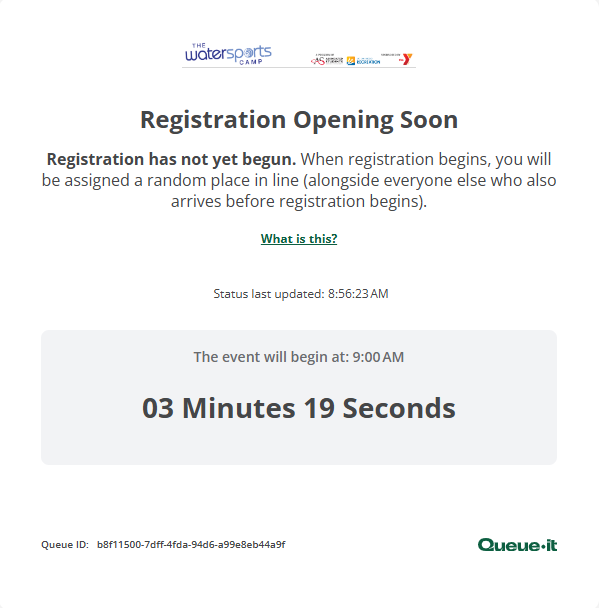
On Monday, March 2, 2026, at 8:30am, users in the waiting room will be assigned a place in line at random and let in to register as soon as possible without overloading the system. Whether you show up 15 minutes or 1 minute prior, you will still be randomly assigned a spot in the queue. Once the queue is initiated, please wait patiently for the system to let you in. It is important that you DO NOT CLOSE YOUR BROWSER WINDOW, or you will lose your spot in the queue.
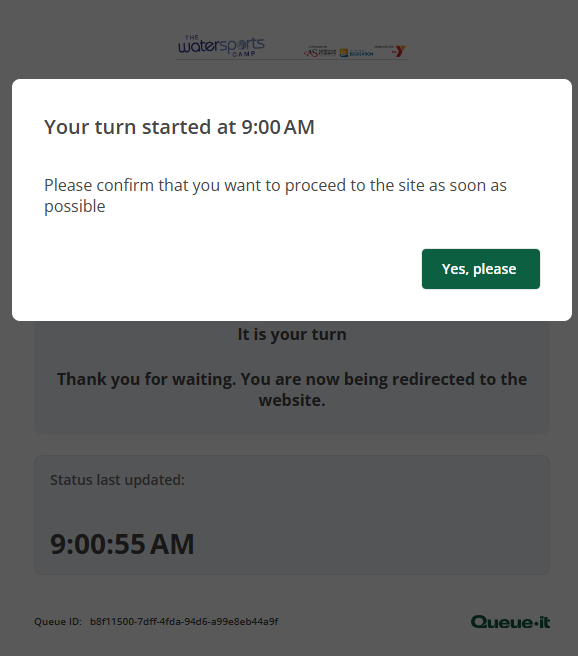
Once it is your turn to enter, you will be shown the image below and will need to click on “Yes, please” in order to enter the camp registration system.
NEW – Camp Availability Chart
Last summer, we launched a Camp Availability Chart that helped provide a quick view of camps that have filled and camps that are still available. We plan to update this chart throughout the morning to help with determining which camps may still be available. We recommend opening this chart before camp registration begins and leaving it open in another browser tab until you have completed your registration.
Have A Backup Plan Ready
We hope you get the activity and week you are hoping for, but in the chance you are unable to, it’s a good idea to talk to your camper(s) about what their backup activity preferences are, or if you’d prefer to try to attend another week when your top activity choice is available.
Understanding Waitlist Options

If a camp activity is full, you will have the option to waitlist by clicking the orange cart. You will then have to select one of two waitlist options listed below:
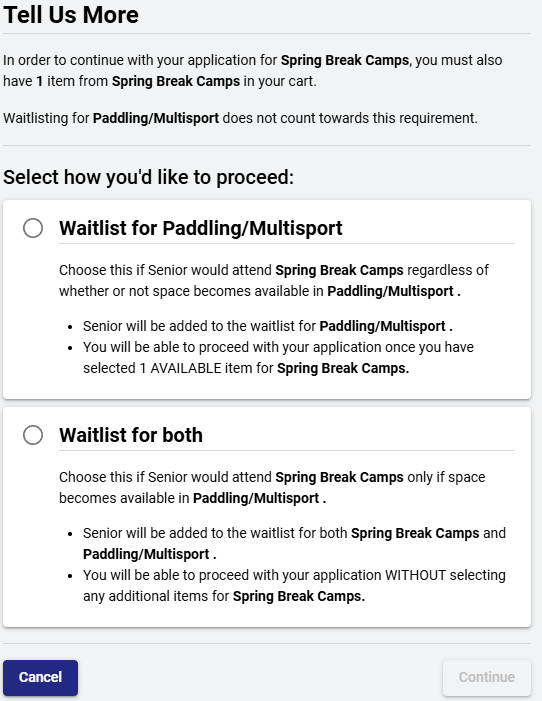
Choose the first option: “Waitlist for Paddling/Multisport” if you want to attend the selected week anyway, and will select your backup activity to register your camper for. If paddling becomes available, we will contact you.
Choose the second option: “Waitlist for both” if your camper only wants to attend the week if space becomes available in the activity you are waitlisting for. If you choose this option, you will not select an alternate activity. You are waitlisting for the activity and for the week. You are not required to pay in advance for any waitlisted activities with this option, but you must still complete the registration to be added to the waitlist.
PLEASE NOTE: If you select the first option and later realize there are no alternate activities that you want to register for, you will need to remove the waitlisted camp from your cart and select “Waitlist for both” to complete your registration. This is the most common issue that families encounter and get stuck on during registration.
Please keep in mind that many waitlisted campers will be able to register in their preferred activity, sometimes even on opening day, as others abandon their cart or change their plans shortly after registration. It never hurts to waitlist for an activity.
Register on a reliable computer/connection
Many times, issues that arise during registration are due to a poor internet connection or due to the performance of the computer. Our software provider recommends that you ensure you have a reliable internet connection and a desktop or laptop to register. While it may be more convenient, registering on a mobile device is not recommended.
Do not log into your account on multiple computers
The software system will automatically log out one of the users if multiple people log in to the same account at the same time. This will cause you to lose your place in the queue.
Be patient and wait for pages to load
If you see a spinning wheel or a page takes a little longer to load, please be patient and wait for the pages to load completely. During high registration periods, the system can only handle so much activity at a time and loading times will slow down. DO NOT CLOSE YOUR WINDOW/TAB, HIT THE BACK BUTTON, OR LOG OUT, as you will lose your place in line.
Need Help On Registration Day?
To ensure we can assist families who experience difficulties on registration day, we kindly ask that non-urgent questions be directed via:
Email: in**@*************mp.com
Phone: 858-539-2003 (for general questions after registration day)
For technical issues during registration, please call (858) 488-1000.
Please note: We do not accept camp registrations in person or over the phone.
Get Ready! Registration Opens Soon!
Summer camp registration begins Monday, March 2, 2026, at 8:30 AM at watersportscamp.com or at watersportscamp.campbrainregistration.com.